Fleet Monitoring
Fleet monitoring allows you to track the real-time location, speed, and status of your vehicles. Vehicle statuses are dynamically displayed in different colors for quick identification.
Vehicle Data Monitoring
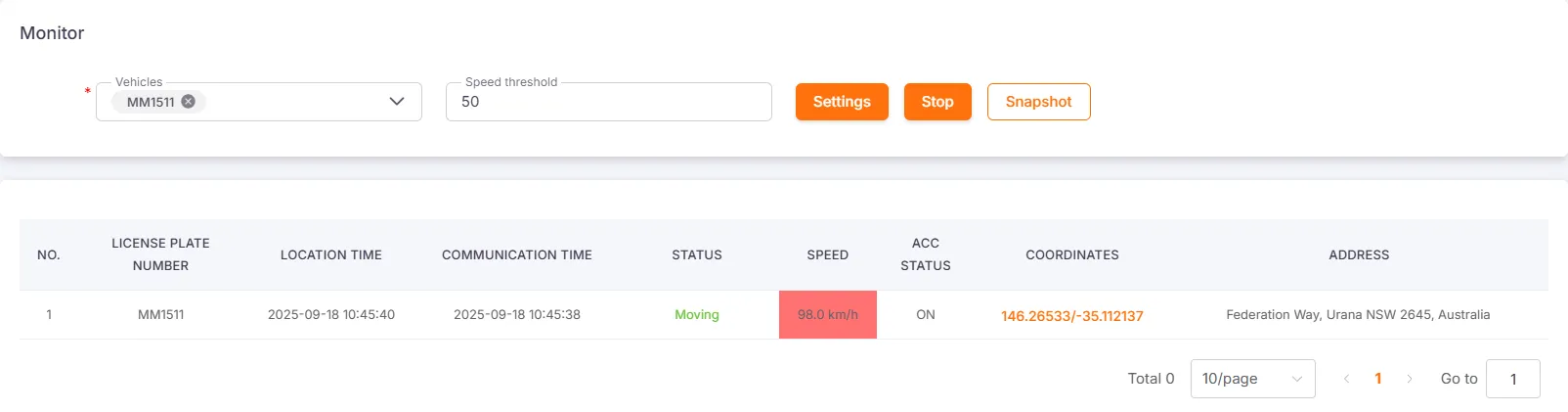
Section titled “Vehicle Data Monitoring”You can select a vehicle to begin real-time monitoring. When the vehicle reports new data such as coordinates, speed, and alerts, the interface will update dynamically, displaying different colors based on the vehicle’s status.
Vehicle Online Status
Section titled “Vehicle Online Status”If the device is not using GPS positioning, the vehicle status will only show as Online or Offline.
| Status | Display |
|---|---|
| Online | Green text |
| Offline | Black text |
GPS Positioning Status
Section titled “GPS Positioning Status”When the device uses GPS positioning, the vehicle status will be displayed in different colors.
| Status | Display | ACC-based Criteria | Speed-based Criteria |
|---|---|---|---|
| Moving | Green text | Speed ≥ 5 km/h and ACC is ON | Speed ≥ 5 km/h |
| Idling | Orange text | Speed < 5 km/h and ACC is ON | Speed ≤ 5 km/h |
| Stationary | Red text | Speed < 5 km/h and ACC is OFF | - |
| Illegal Movement | White text, red background | Speed ≥ 5 km/h and ACC is OFF | - |



ACC Status Highlight
Section titled “ACC Status Highlight”When the ACC status changes, its background will turn yellow and flash for 5 seconds.

Speed Threshold Highlight
Section titled “Speed Threshold Highlight”After setting a value in the Speed Threshold input box and clicking Set, the system will highlight all devices exceeding this speed.
Vehicle Snapshot Monitoring
Section titled “Vehicle Snapshot Monitoring”You can choose to use snapshot monitoring for real-time tracking. Snapshots are taken according to the interval configured for the device.
Vehicle Snapshot Updates
Section titled “Vehicle Snapshot Updates”When a snapshot is updated, it will flash for three seconds.

Vehicle Snapshot Timeout
Section titled “Vehicle Snapshot Timeout”You can set a timeout for snapshots. After the set time, the snapshot will turn gray.