Live Stream
Live Stream Configuration
Section titled “Live Stream Configuration”
- Select the
Channel,Media server node, andLive stream sourceyou want to watch. ClickSearchto go to the live stream page.
Live Stream Page
Section titled “Live Stream Page”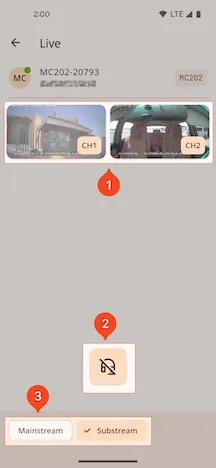
1. Live Stream Channel Display
Section titled “1. Live Stream Channel Display”- Displays all selected channel feeds. Clicking on a feed will enter full-screen landscape mode.
2. Live Intercom
Section titled “2. Live Intercom”-
Click to load the live stream feature. Once loaded, the intercom control panel will be displayed.
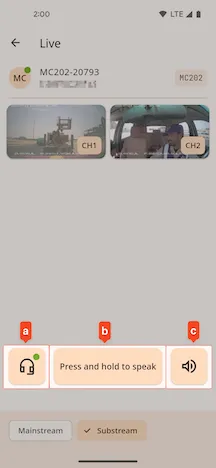
- a. Live Stream Switch
- b. Talk Button.
Press and hold to speak, release to stop talking - c. Speaker Switch