Device File List
Device File List
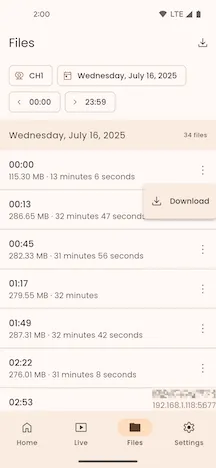
Section titled “Device File List”Filter Files
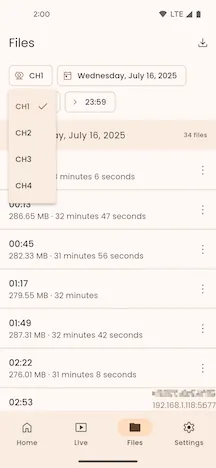
Section titled “Filter Files”Click the Channel menu button to select the device channel you want to view.
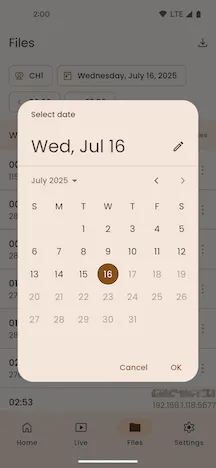
Click the Date selection button to choose the creation date for the files.
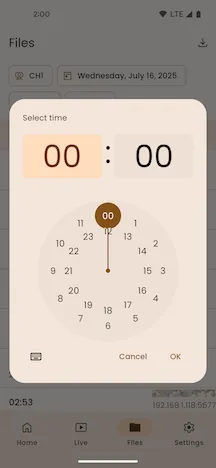
Click the Time selection button to choose a creation time period for the files.
File List
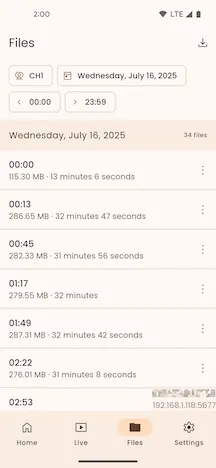
Section titled “File List”The file list groups device files by date. It displays all files from the selected channel, date, and time period in ascending order of creation time, along with a count of files for each date.
Refresh List
Section titled “Refresh List”Pull down to refresh the device file list. This will re-query and load the file list from the device.
File Information
Section titled “File Information”Each item in the file list displays the file’s creation time, its size on disk, and the media duration.
Download Files
Section titled “Download Files”Click the More button on the right of a file list item, and then click the Download button in the pop-up menu to go to the Device File Download page.
View Downloads
Section titled “View Downloads”Click the Downloads button on the right side of the top app bar to go to the Downloaded Files page.